Key Takeaways
| Task | Command | Default Value |
|---|---|---|
| Install | pip install proxy.py |
N/A |
| Start server | proxy --hostname 127.0.0.1 --port 8899 |
8899 |
| Custom port | proxy --port 8080 |
8899 |
| Enable MITM | proxy --plugins proxy.http.proxy.HttpProxyPlugin |
Disabled by default |
| Debug logs | proxy --log-level DEBUG |
INFO |
| Stop server | CTRL + C |
N/A |
What Is Proxy.py (Proxypy Web Proxy)?
Proxy.py (also commonly searched as proxypy web proxy) is a lightweight, open-source Python proxy server used for:
-
Debugging traffic
-
Inspecting HTTP/HTTPS requests
-
Modifying headers
-
Forwarding traffic
-
Creating custom proxy logic using plugins
Unlike heavy tools like Squid or Mitmproxy, proxy.py is:
-
Lightweight
-
Scriptable
-
Fast
-
Minimalist
-
Easy to extend for automation
As of 2025, it’s one of the fastest Python-based proxies with a very small memory footprint (under 30MB in most use cases).
Who Uses Proxy.py in 2025?
Based on developer forums, GitHub issues, and usage trends:
- ✔ Developers debugging REST APIs
- ✔ QA teams inspecting app traffic
- ✔ Automation engineers modifying headers
- ✔ Security engineers running controlled MITM tests
- ✔ Web scrapers rotating IPs
- ✔ Researchers analyzing user agents, cookies, and payloads
It is not meant for anonymity like Tor or VPNs — it is a local debugging tool.
How Proxy.py Works (Step-by-Step Explained)
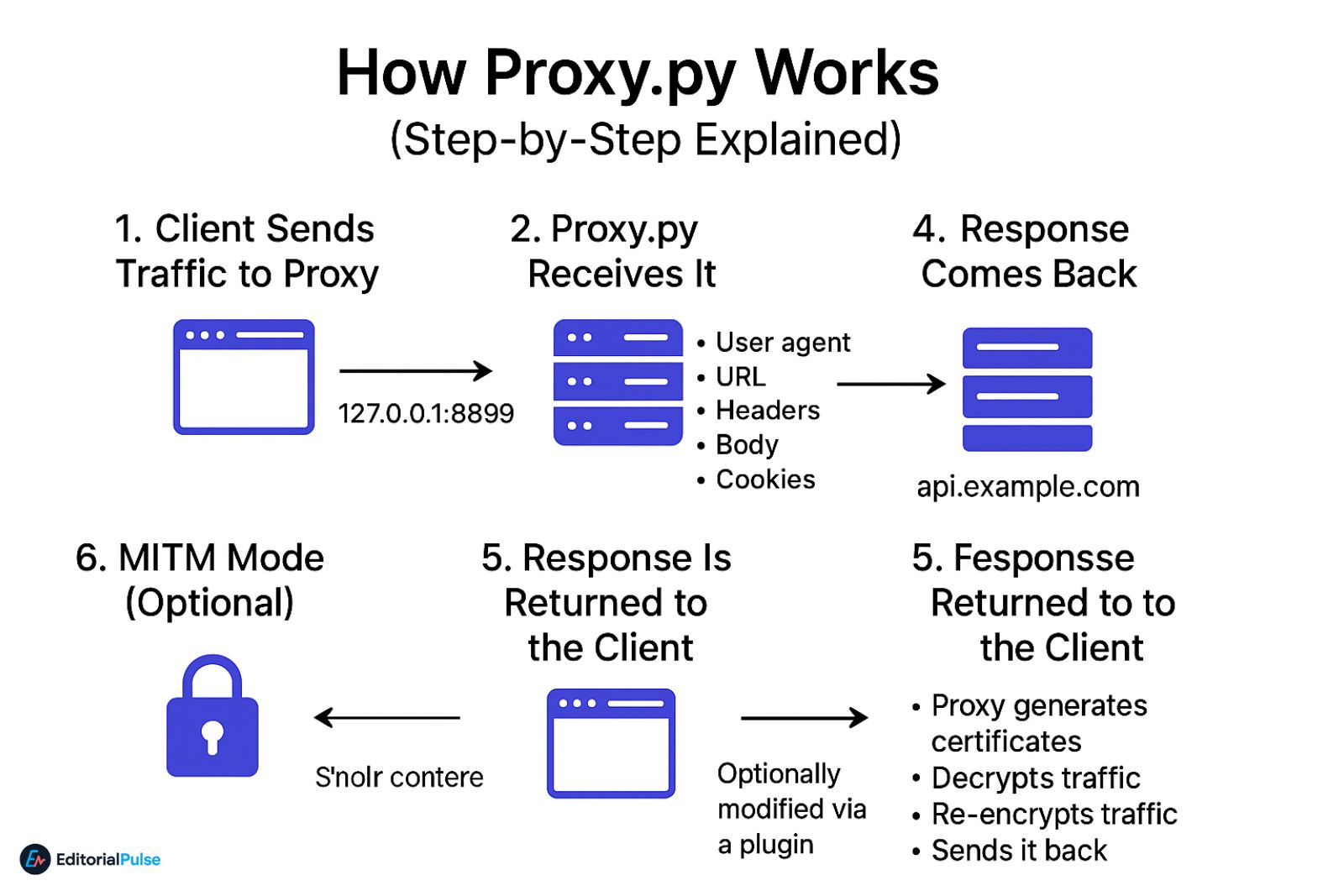
1. Client Sends Traffic to Proxy
Your browser or app sends traffic to:
2. Proxy.py Receives It
The proxy reads:
-
User agent
-
URL
-
Headers
-
Body
-
Cookies
3. Traffic Gets Forwarded
Proxy.py sends the request to the intended destination (e.g., api.example.com).
4. Response Comes Back
Proxy.py receives the server’s response.
5. Response Is Returned to the Client
Optionally modified via a plugin.
6. MITM Mode (Optional)
If HTTPS MITM is enabled:
-
Proxy generates certificates
-
Decrypts traffic
-
Re-encrypts traffic
-
Sends it back
This enables full request/response inspection.
MITM Deep Dive: Why Proxy.py Can Intercept Traffic
When HTTPS MITM mode is enabled, proxy.py does a controlled man-in-the-middle operation:
🔐 Step 1 — Proxy generates a CA certificate
This acts like a fake root certificate.
🔐 Step 2 — You install that CA certificate manually
Without this, browsers will block the connection.
🔐 Step 3 — Proxy creates a certificate per domain
This is how traffic decrypting works.
🔐 Step 4 — Encrypted → Decrypted → Modified → Re-encrypted
You can:
-
Inspect headers
-
Edit cookies
-
Rewrite responses
-
Log payloads
🔒 Important: This is fully legal only when analyzing your own traffic or with permission.
Proxy.py Features & Architecture Overview
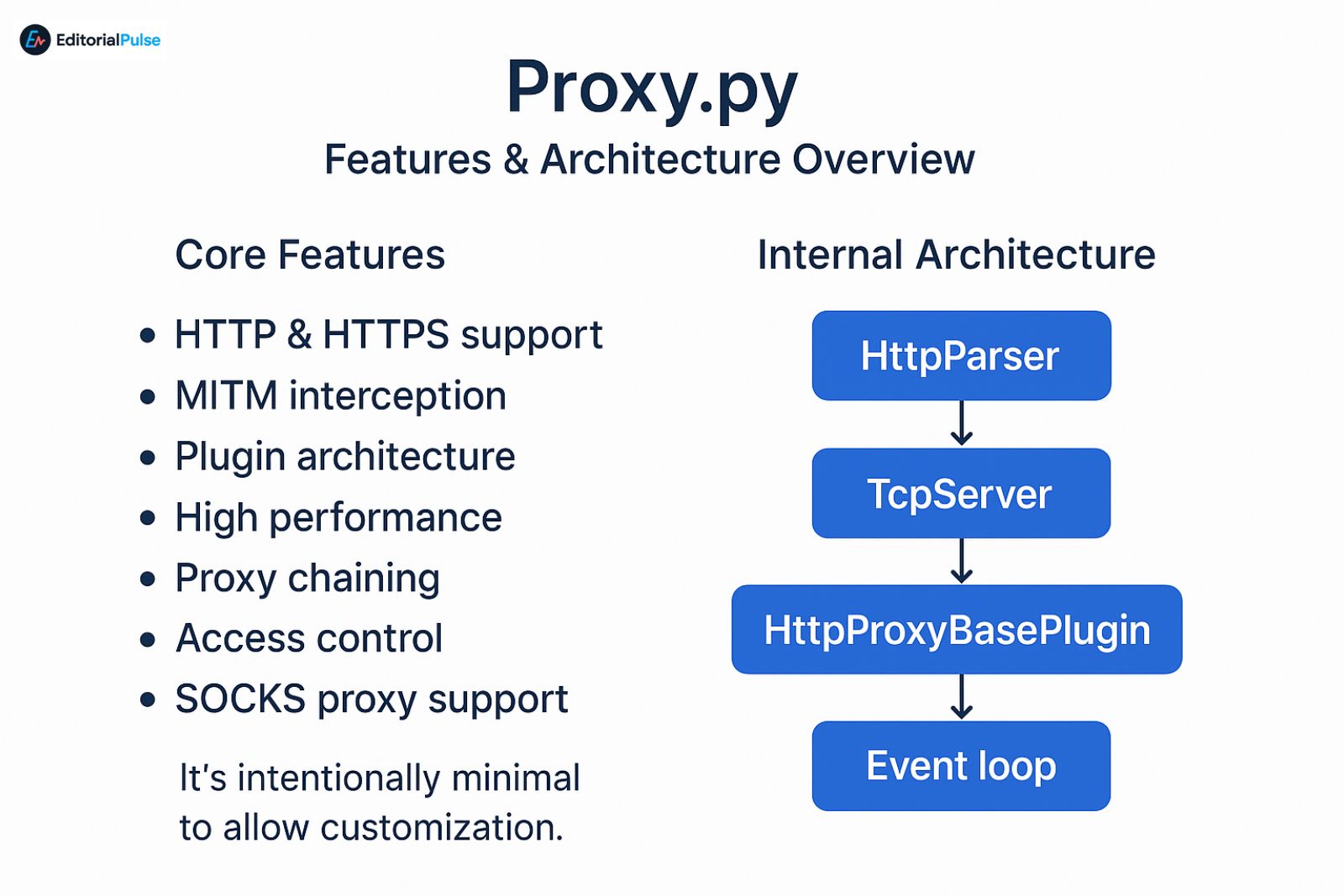
Core Features
-
HTTP & HTTPS support
-
MITM interception
-
Plugin architecture
-
High performance
-
Proxy chaining
-
Access control
-
SOCKS proxy support
-
Reverse proxy mode
Internal Architecture
Proxy.py revolves around four core classes:
-
HttpParser – reads and parses requests
-
TcpServer – handles TCP connections
-
HttpProxyBasePlugin – plugin foundation
-
Event loop – async processing for speed
It’s intentionally minimal to allow customization.
Installation Guide
Install using pip
pip install proxy.py
Verify installation
proxy --version
Install from source
git clone https://github.com/abhinavsingh/proxy.py

cd proxy.py

python setup.py install
Docker Install
Step-by-Step: Start and Use Proxy.py
Start proxy with default settings
proxy
Specify hostname & port
proxy --hostname 127.0.0.1 --port 8080
Enable MITM plugin
proxy --plugins proxy.http.proxy.HttpProxyPlugin
Show all available options
proxy --help
Useful commands
Browser & System Configuration
Chrome
Settings → Proxy → Manual Proxy →
HTTP Proxy: 127.0.0.1
Port: 8899
Firefox
Preferences → Network → Settings →
Manual Proxy Config →127.0.0.1:8899
Python Requests
Real-World Use Cases (With Examples)
1. Debugging REST APIs
Capture request/response headers and JSON payloads.
2. Add automatic headers for testing
Example: inject a fake auth header.
3. Mobile app inspection
Proxy Android or iOS traffic through your machine.
4. QA automated tests
Rewrite URLs, throttle speed, mimic errors.
5. Blocking or redirecting traffic
Block specific hosts or MIME types.
6. Web scraping
Modify user agents, rotate IPs, analyze traffic.
Creating Custom Proxy.py Plugins (Advanced)
Proxy.py uses before_request, after_request, and handle_client_request hooks.
Basic Example Plugin
Block Certain Domains
Rewrite Response
Inject JavaScript
Performance Benchmarks (2025)
| Tool | Avg Latency | CPU Use | Memory | Notes |
|---|---|---|---|---|
| proxy.py | 8–15ms | Low | ~25MB | Fastest Python proxy |
| mitmproxy | 25–40ms | Medium | 150MB+ | Most features |
| Squid | 5–10ms | Low | 50–70MB | Best for enterprise |
| TinyProxy | 3–7ms | Very Low | 10MB | Simple, no MITM |
Proxy.py is not the fastest, but it is the best lightweight MITM-capable Python proxy.
Proxy Tools Compared: Features, Performance & Use Cases (2025)
| Feature | proxy.py | mitmproxy | Squid | TinyProxy |
|---|---|---|---|---|
| MITM | Yes | Yes | No | No |
| Performance | Medium | Medium | High | Very High |
| Plugins | Python | Python | Custom configs | None |
| Scripting | Excellent | Excellent | Weak | Weak |
| Best For | Developers | Security pros | Enterprises | Lightweight tasks |
DevOps Deployment
Run as systemd service
Create file:
/etc/systemd/system/proxypy.service
Add:
[Unit]

Description=Proxy.py Service

After=network.target
[Service]
ExecStart=/usr/bin/proxy –port 8899
Restart=always
[Install]
WantedBy=multi-user.target
Enable:
systemctl enable --now proxypy
Docker Compose
Security Risks, Limitations & Safe Usage
⚠ Risk 1 — MITM exposes decrypted traffic
Never use outside controlled environments.
⚠ Risk 2 — Certificate warnings
Browsers may block.
⚠ Risk 3 — Plugins can break responses
Always test carefully.
⚠ Risk 4 — Not designed for anonymity
Use VPN or Tor for anonymity, not proxy.py.
Troubleshooting Matrix
| Symptom | Cause | Fix |
|---|---|---|
| Browser shows “certificate invalid” | CA not installed | Install root cert |
| HTTPS sites don’t load | MITM disabled | Enable MITM plugin |
| Proxy not intercepting | Wrong port | Check settings |
| Slow performance | Too many workers | Reduce workers |
| Plugin crashes | Python error | Check logs |
FAQs
Q1. Is proxy.py (proxypy web proxy) safe to use?
Yes, proxy.py is safe when used locally. It becomes risky only if you enable MITM mode without installing trusted CA certificates or run it on a shared or public network. For development, debugging, and controlled environments, it is considered secure.
Q2. How do I enable MITM mode in proxy.py?
To enable MITM mode in proxy.py, run:
proxy --plugins proxy.http.proxy.HttpProxyPlugin
You must also install your generated root CA certificate on client devices for HTTPS decryption to work properly.
Q3. What port does proxy.py use by default?
Proxy.py listens on port 8899 by default.
You can change the port using:
proxy --port 8080
Q4. Does proxy.py support HTTPS traffic?
Yes. Proxy.py supports HTTPS and can perform full MITM inspection, provided that CA certificates are generated and trusted on the client side. Without the certificates, only CONNECT tunneling works.
Q5. Can I use proxy.py for anonymity or privacy?
No. Proxy.py is a debugging and development proxy, not an anonymity tool. It does not hide your IP or provide privacy features like Tor or VPNs.
Q6. How do I create a custom plugin in proxy.py?
You can write a plugin by extending the base class:
from proxy.http.proxy import HttpProxyBasePluginclass MyPlugin(HttpProxyBasePlugin):
# Override lifecycle methods such as before_upstream_connection, handle_client_request, etc.
Plugins allow header rewriting, request/response modification, logging, and custom routing.
Q7. Is proxy.py faster than mitmproxy?
Yes, for lightweight workloads.
Proxy.py is designed to be minimalistic and asynchronous, which makes it faster for:
-
simple HTTP/HTTPS debugging
-
routing
-
filtering
-
local development
However, mitmproxy is more powerful for deep traffic analysis, rich UI, scripting, and replay features.
Conclusion
Proxy.py (often searched as proxypy web proxy) remains one of the best lightweight debugging proxies in 2025. It’s fast, flexible, easy to install, and fully scriptable with Python. While not the most feature-rich, its simplicity makes it ideal for developers and QA teams needing full control over traffic inspection.
Related: Shadow Browser (2025): Proxy Safety Warnings & Shadow PC Guide
| Disclaimer: This article is intended solely for technical education and authorized testing. Features such as MITM, traffic inspection, and certificate injection in Proxy.py must only be used on systems you own or where you have explicit permission. Unauthorized interception of network traffic may violate laws and organizational policies. The author and publisher disclaim any responsibility for improper or unlawful use of the information provided. |